

Audience Overview
An audience packages a set of user filter conditions into a named object. Once defined, any number of experiments and remote config rules in your project can reference it by name — no need to rewrite conditions like "device = iOS AND app version ≥ 1.8.0" every time.
Problems audiences solve
Scenario 1: One definition, used everywhere
Context: You define "high-value users = lifetime spend ≥ 100". This segment is needed in many places — a pricing experiment, an ad frequency experiment, a first-purchase bundle config, a push notification strategy, and more.
With audiences: Create "high-value users" once in audience management, then select that audience in every experiment and remote config that needs it. The business definition stays consistent: "high-value users" means the same thing everywhere across the project.
Scenario 2: Definition changes, all references update automatically
Context: Your manager decides that "lifetime spend ≥ 100" is too low and wants to change the threshold to ≥ 200.
With audiences: Update the audience's filter conditions → every experiment and config that references it automatically evaluates against the new definition. No need to update each experiment individually — this is the key difference between audiences and copying conditions inline.
Scenario 3: Fine-grained segment targeting
Context: Different regions, platforms, and spending tiers call for different operating strategies.
With audiences: Build a set of non-overlapping audiences — "Japan users", "Korea users", "Southeast Asia users", "iOS high-value", "Android new users" — and use them to deliver different remote config values per audience or run independently tuned experiments per segment.
Core capabilities
1. Define once, use everywhere
Consistent business definitions are the primary value of audiences. Once "high-value users", "new-version users", or "Japan players" are defined in a project, every experiment and config shares the same definition.
2. Change once, all references update
When a business standard changes, update the audience rule — all experiments and configs that reference it automatically pick up the new definition. This is the essential difference between audiences and writing conditions inline in each experiment.
3. Locked when referenced by active experiments — copy a new version
Platform safeguard: When an audience is referenced by a running experiment, its rule editor is locked. This prevents the accident of silently changing the target population of every live experiment that uses that audience.
Recommended approach: When you genuinely need to change an audience rule, copy a new version (e.g.
paid_users_v2), update v2, and point new experiments to v2. Let old experiments finish on v1 before archiving it.
4. Reverse lookup of linked experiments
The # of Experiments column in the audience list shows which experiments are currently using each audience — so you never have to wonder whether an audience is still in use.
How audiences relate to other objects
Audiences are built on top of two lower-level objects and consumed by two higher-level ones:
| Layer | Object | Meaning |
|---|---|---|
| Lower | Attribute | A single user characteristic field (e.g. country, app version, spending tier) |
| Middle | Audience | A named user segment rule composed of one or more attribute conditions |
| Upper | Experiment / Remote Config | References an audience to determine which users are in scope |
Both ends are one-to-many:
- One audience can reference multiple attributes.
- One audience can be referenced by multiple experiments and configs.
The reverse question — "which experiments use this audience?" — is answered directly by the # of Experiments column in the audience list.
Where to manage
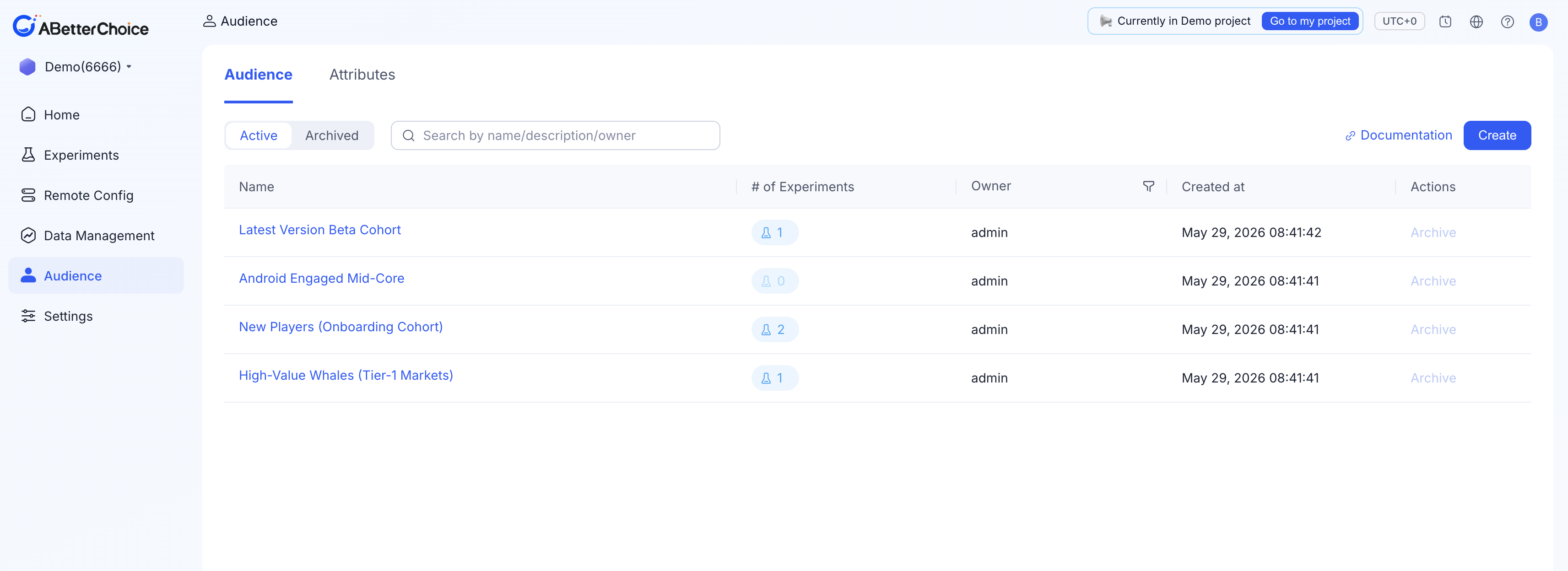
Click Audience in the left navigation. The page has two tabs:
| Tab | Contents |
|---|---|
| Audience | All named audiences in the project. Each row shows: name, linked experiment count, Creator, Created At, and an Archive action. |
| Attributes | The attribute catalog available when building rules. Each row shows: name, data type, Creator, Created At, and an Archive action. |
Both tabs share the Active / Archived filter and the search box at the top.
Lifecycle at a glance
The audience lifecycle is intentionally short: Active by default after creation, eventually archived.
| State | Meaning |
|---|---|
| Active | The audience can be referenced by new experiments and configs, and participates in evaluation. |
| Archived | The audience is hidden from the default list and cannot be referenced by new experiments. Archiving is blocked if the audience has any live experiments or live configs. |
Archiving is not deletion — the audience's name, rules, and associations are preserved. You can Unarchive it at any time.