

SRM (Sample Ratio Mismatch) Check
This page explains how to detect Sample Ratio Mismatch (SRM) in experiments and how to debug traffic-split imbalances caused by targeting, exposure, or logging issues.
What is SRM?
Sample Ratio Mismatch (SRM) occurs when the actual user counts in each group deviate significantly from the expected allocation ratio.
For example: you configure a 50/50 split, but end up with 9,000 users in the control group and 1,000 in the treatment group → SRM is detected, indicating that the randomization mechanism has broken down and results are no longer trustworthy.
SRM Check Mechanism
The experiment platform automatically runs an SRM check on all experiments as part of the health check.
Detection method: Chi-squared goodness-of-fit test
- p-value < 0.01 → significant imbalance → SRM alert triggered
- p-value < 0.001 → severe imbalance → red alert
Platform display:
| Element | What it shows |
|---|---|
| Health check | "Is exposure balanced?" indicator; green = no SRM |
| Cumulative exposure chart | Time series of user counts per group |
| SRM alert indicator | Red badge + alert message (p < 0.001) |
| Tooltip | Observed vs. expected values + p-value |
How to Diagnose SRM
Step 1: Review the cumulative exposure chart
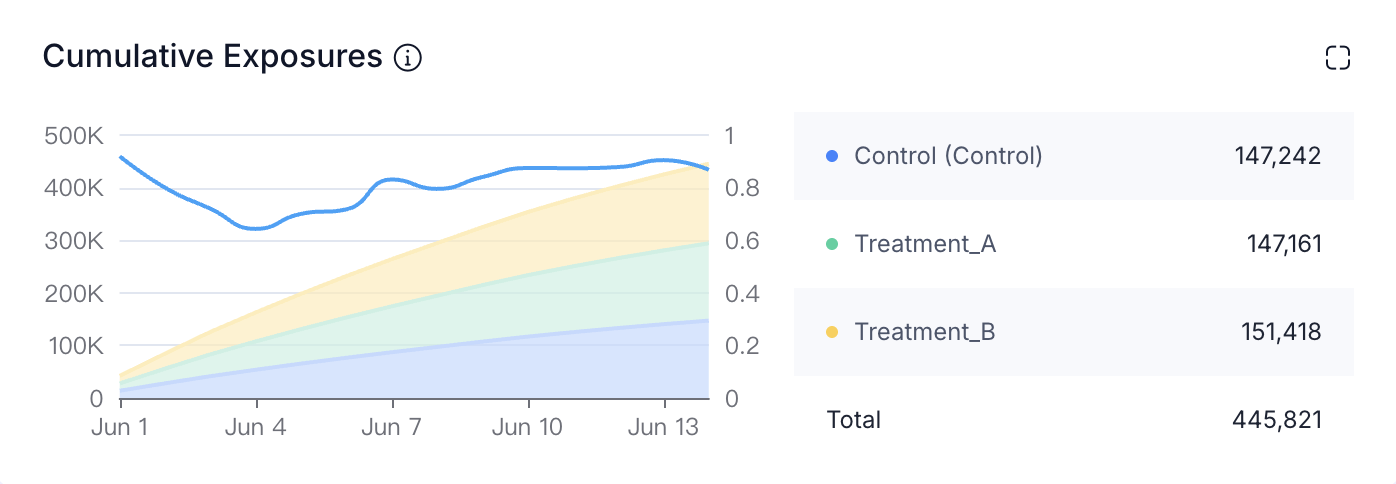
| Time pattern | Possible cause |
|---|---|
| Imbalance appears from the start | Bucketing code defect or configuration error |
| Imbalance develops gradually | Asymmetric attrition (crashes accumulate over time) |
| Imbalance appears at a specific point in time | Code deployment or configuration change introduced a defect |
Step 2: Check group-level metrics
Focus on: crash rate, error rate, exposure rate, retention rate.
If treatment group crash rate >> control group crash rate → users are dropping out early; SRM is a symptom, not the root cause.
Step 3: Check recent deployments and configuration changes
- Code deployment records near the time the imbalance appeared
- Experiment configuration changes (traffic allocation, targeting conditions)
- Remote Config changes
Step 4: Break down by dimension
Identify which dimensions concentrate the SRM (browser, OS, SDK version, region, etc.). Dimensional breakdown quickly pinpoints whether SRM appears only in a specific browser, OS, or SDK version.
What to do after SRM is detected
- Find the root cause — this determines whether the experiment results can still be used
- Discard the current experiment and re-run — after fixing the root cause, re-run the experiment with the same design (the new experiment uses a different randomization seed, making group assignments independent of the previous run)
- Do not try to "fix" the data from the already-run experiment at the analysis stage — the most rigorous approach is to re-run