

What is Warehouse Native
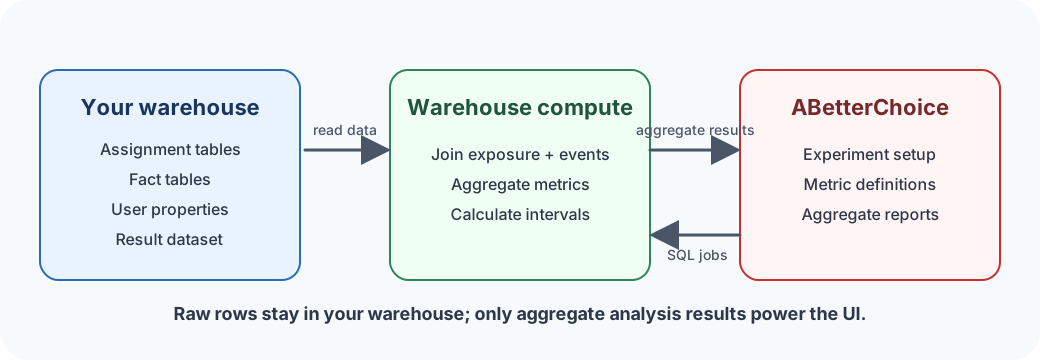
Warehouse Native lets you run experiment analysis directly on your data warehouse, so raw player and event data stays under your privacy and access controls. ABetterChoice generates SQL, submits it to your warehouse, and reads only aggregate results — session rows, IAP rows, ad-event rows, and player attributes never leave your warehouse boundary.
It integrates easily with the data you already have. Assignment data can come from the ABetterChoice SDK, your server-side assignment service, or your studio's existing experiment system. Fact and user-property data can be the same warehouse tables your LiveOps and game-data teams already use — session events, level-completion events, IAP events, ad-impression and ad-revenue events, currency events, player progression tables, and audience labels.
What you can use it for
- Run experiments on the player data you already have. Session events, level events, IAP events, ad-revenue events, currency events, and player attributes are usually already loaded into your warehouse for LiveOps. Build experiment metrics directly on those tables — no second copy, no parallel ingestion.
- Keep raw player data inside your privacy boundary. Player IDs, device IDs, purchase rows, and player attributes never leave your warehouse. The platform receives only aggregate experiment results — counts, means, confidence intervals.
- Use any assignment source. Plug in the ABetterChoice SDK for fresh assignments, or register the assignment table your existing experiment system already writes. Both paths produce the same exposure tables that drive analysis.
- Keep experiment metrics aligned with LiveOps reporting. Experiment metrics and LiveOps reports read the same warehouse tables, so an analyst questioning whether the experiment number matches the LiveOps number can verify it with a single SQL query against the same source.
Warehouse Native vs traditional
Traditional experimentation tools ingest raw warehouse or event data into a platform-managed store before analysis. Warehouse Native keeps the raw inputs in your warehouse and pushes analysis SQL to that warehouse.
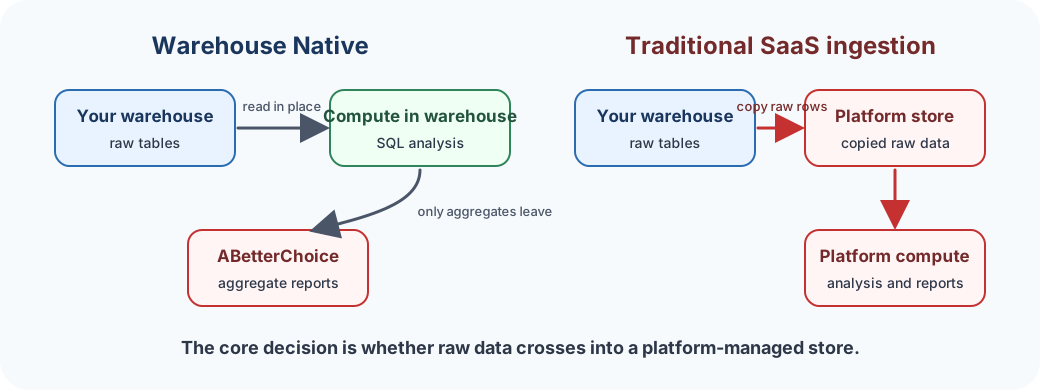
| Decision area | Warehouse Native | Traditional SaaS ingestion |
|---|---|---|
| Raw data location | Stays in your warehouse | Copied into the platform's warehouse |
| Compute location | Runs in the connected warehouse | Runs in the platform's warehouse |
| Metric source of truth | Warehouse tables and registered metric definitions | Platform-side event store and metric definitions |
| Data-team work | Grant access, model tables, tune warehouse jobs | Build and monitor ingestion pipelines |
| Compliance posture | Raw data remains inside your warehouse boundary | Raw data leaves the warehouse boundary |
Get started in three steps
1. Connect your warehouse. Data Management → Warehouse Native lets you connect a warehouse to the project. BigQuery is generally available today; Databricks, Redshift, and Snowflake are tagged Coming soon in the console. See Connecting Your Warehouse for the supported list and BigQuery Connection for the setup walkthrough.
2. Define your data model. Register the warehouse tables that participate in experiment analysis: assignment tables (which player saw which variant), fact tables (session events, level events, IAP events, ad events, currency events), and user-property tables (player level, region, device tier, account age). Registration creates a metadata contract — no data is copied. On top of those tables, build the semantic layer: metric definitions, dimensions, assignment sources, entity properties, and qualifying events. See Define Tables and Semantic Layer Overview.
3. Run experiments and analyze. Once tables and metrics are in place, ABetterChoice generates SQL from your experiment configuration, submits it to your warehouse, reads the aggregate result table, and renders the experiment report.