

Remote Config Experiment
A Remote Config Experiment is an experiment type in ABC designed for fine-grained multi-audience operations. The core idea is "define your audience first, then split traffic" — you identify the user segment you want to test, then select the Remote Config parameters to experiment on, with each audience owning 100% of the traffic independently.
Why you need Remote Config Experiments
Traditional Layer Experiments work the other way: "split traffic first, then define the audience." Once you create an experiment targeting a specific audience, it occupies the entire layer's traffic allocation — users outside that audience are also blocked, wasting traffic.
Scenario comparison
| Business need | Traditional Layer Experiment | Remote Config Experiment |
|---|---|---|
| Test different changes for iOS and Android simultaneously | Two experiments must queue up, taking at least twice as long | Two audiences each run with independent 100% traffic at the same time |
| Lock in experiment results per audience | Winning values are written to the layer's default parameters, with no per-segment distinction | Results are automatically locked into the corresponding audience's configuration |
| Parameter management | Parameters are attached to layers and scattered | Parameter groups offer clear, organized management |
| Experiment unit | Layer → Experiment → Parameter | Audience → Parameter → Experiment |
When to use Remote Config Experiments
Scenario 1: Simultaneous ad strategy tuning across platforms
Background: iOS and Android users in your WeChat mini-game have noticeably different payment habits and ad tolerance, requiring separate strategy tests.
| Action | Details |
|---|---|
| Create audiences | "iOS users" and "Android users" |
| Select parameters | Ad pop-up interval (ad_interval), ad reward coins (ad_reward_coins) |
| Run in parallel | iOS tests "every 3 vs every 5 levels"; Android simultaneously tests "100 vs 200 reward coins" |
| Ship results | Winning values for iOS and Android are written separately into their respective audience configurations |
With the traditional approach, the two experiments can only run sequentially, taking at least twice as long.
Scenario 2: First-day experience optimization by new user cohort
Background: New users from different acquisition channels have different quality levels and need differentiated onboarding strategies.
| Action | Details |
|---|---|
| Create audiences | "WeChat organic new users", "Paid acquisition new users" |
| Select parameters | Tutorial level count (tutorial_levels), day-one free item count (free_items_day1) |
| Experiment design | Organic traffic tests "3-level vs 5-level tutorial"; paid users test different free item counts |
| Metrics to watch | Day-2 retention, day-1 completion rate, day-1 payment rate |
Scenario 3: Monetization parameters tiered by user value
Background: Monetization strategies should differ between high-value payers and regular users.
| Action | Details |
|---|---|
| Create audiences | "High-value payers (lifetime spend > ¥100)", "Regular users" |
| Select parameters | First purchase bundle price (first_charge_price), daily special discount rate |
| Run in parallel | Both audiences run concurrent monetization parameter experiments |
| Ship results | Winning configs for each audience are locked in independently — high-value payers see one pricing strategy, regular users another |
Scenario 4: Independent parameter tuning across regions
Background: Users in different regions may need different event parameters, product pricing, and difficulty curves, each requiring separate tuning.
| Action | Details |
|---|---|
| Parameter group | Create an "Event Parameters" group to centrally manage all event-related parameters |
| Create audiences | "Japan users", "Korea users", "Southeast Asia users" |
| Select parameters | Event reward multiplier, event duration, bundle price threshold |
| Outcome | Three regions tune independently without interfering with each other; winning values are locked into their respective audiences |
Core capabilities
1. Parameter group management — no more tangled parameters
Group business-related parameters into the same parameter group for easy discovery and management. A parameter can belong to only one group (including "Ungrouped").
| Parameter group | Example parameters |
|---|---|
| Monetization | First purchase price, ad frequency, bundle discount, ad rewards |
| Level experience | Level difficulty coefficient, starting lives, item drop rate |
| Event operations | Event reward multiplier, event duration, event entry placement |
| Onboarding | Tutorial level count, free item count, tutorial dialogue content |
Parameter groups also define the boundary for multi-parameter experiments: parameters within the same group can be tested together in a single experiment, ensuring scientific validity.
2. Audience-level precision — define your audience first, then split traffic
Each parameter can be configured with different values per audience. The SDK matches and returns values by evaluating audiences in priority order from top to bottom.
Example — configuration for the "ad pop-up interval" parameter:
| Priority | Audience | Value |
|---|---|---|
| 1 | High-value payers | Every 10 levels |
| 2 | iOS new users | Every 3 levels |
| 3 | Android new users | Every 5 levels |
| — | All other users (fallback) | Every 5 levels |
When a user arrives, the SDK matches from top to bottom and returns the value for the first audience the user qualifies for.
3. Smart conflict validation — no surprises
The system automatically validates conflicts when you create an experiment:
| Situation | System behavior |
|---|---|
| The same parameter already has an active experiment for the same audience | Blocked — ensures the same segment cannot run two experiments on the same parameter simultaneously |
| The same parameter has an active experiment under a different audience | Confirmation prompt — informs you that another audience is testing the same parameter; the experiment created earlier takes priority |
4. Precise result consolidation — experiment conclusions become live configuration
After the experiment ends, you select the winning variant to ship, and the system automatically writes the winning values back to the corresponding audience configuration for each participating parameter.
Before shipping:
| Audience | Ad interval |
|---|---|
| Android new users | Every 5 levels |
| All other users | Every 5 levels |
Experiment conclusion: Best value for iOS new users = every 3 levels. After shipping:
| Audience | Ad interval | Change |
|---|---|---|
| iOS new users | Every 3 levels | New — locked from experiment |
| Android new users | Every 5 levels | Unchanged |
| All other users | Every 5 levels | Unchanged |
No manual config updates required, no developer involvement for hard-coding — experiment conclusions go live in one click.
Creation flow
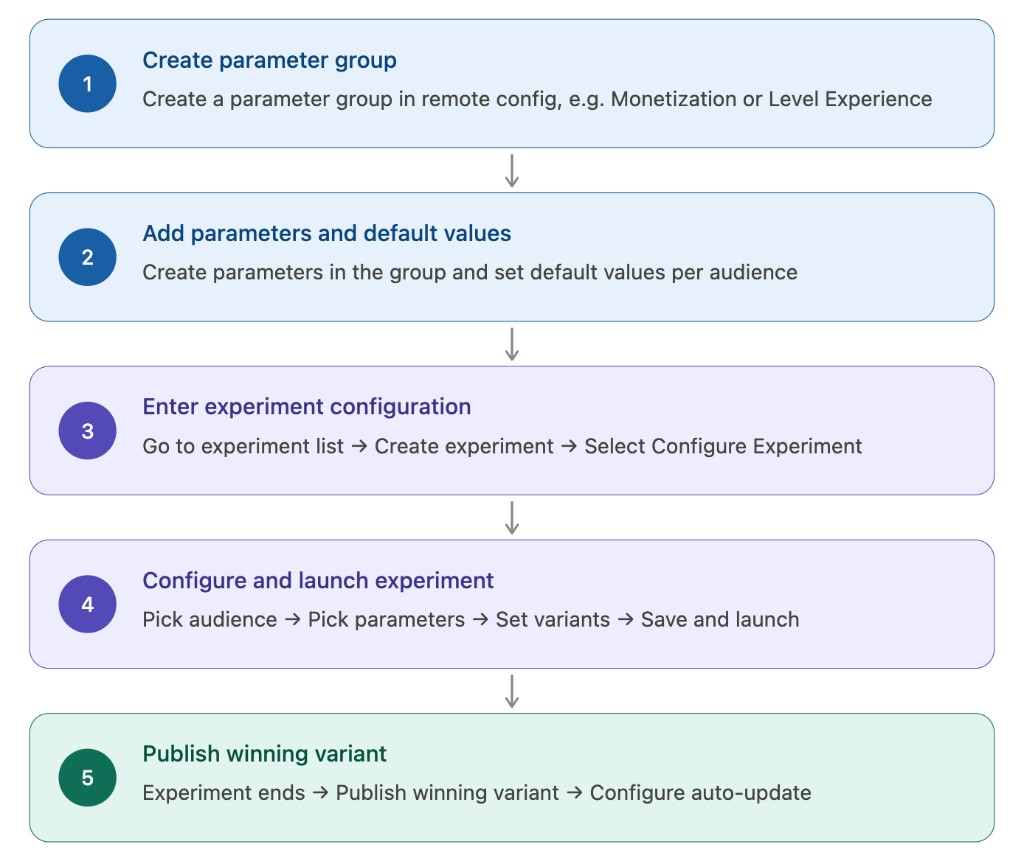
Three-step creation walkthrough
Step 1: Select audiences
- You can select any number of already-configured audiences
- At least one audience is required
Step 2: Select parameters
Interaction: category dropdown linked to a parameter dropdown
- First parameter: choose from all parameters (grouped and ungrouped)
- Category is locked after first selection: if the first parameter belongs to a parameter group, subsequent selections are restricted to the same group; if it is ungrouped, only other ungrouped parameters can be added
- Switching category manually: triggers a confirmation dialog; confirming clears all previously selected parameters and configurations
Why must parameters be from the same group? This is a design choice to ensure experimental validity. Parameters in the same group are typically related in business terms (e.g., all under "Monetization"), and testing them together is the only way to accurately evaluate their combined effect.
Step 3: Configure variants
- Control value = current configured value of the selected parameter for the selected audience (auto-filled)
- Treatment variants can have modified parameter values (multiple treatment variants are supported)
- When multiple audiences are selected, treatment values are configured separately per audience dimension
Experiment lifecycle
Follows the same pattern as other experiment types: Not Started → In Progress → Shipped → Archived.
| Stage | Description |
|---|---|
| Not Started | Entered after creation. You can verify parameter delivery and edit the experiment configuration |
| In Progress | Started after debugging. Traffic is split according to configuration and data collection begins |
| Shipped | Winning variant selected and shipped. Consolidation logic is triggered; experiment values are written back to configuration |
| Archived | Can be archived after shipping. Experiment data is retained and no longer affects parameter values |
Key difference: After a Remote Config Experiment is Shipped, the winning values are automatically consolidated — they directly overwrite the corresponding audience parameter values in Remote Config, with no manual update needed.
Conflict validation details
The system performs the following checks when you create or save edits to an experiment:
| Check | Trigger condition | Handling |
|---|---|---|
| Check 1: Same audience, same parameter — blocked | An audience selected for the current experiment already has an active experiment referencing the same parameter | Blocked — saving is not allowed |
| Check 2: Cross-audience parameter overlap — prompt | No conflict under the current experiment's audiences, but another audience has an active experiment referencing the same parameter | Modal prompt — you can proceed after confirming |
Check 1 block example:
Parameter [parameter name] already has an active experiment [experiment name] under audience [audience name]. Cannot create. Please end the related experiment first.
Check 2 modal example:
User wants to create an experiment: Audience = North America users, Parameters = Parameter A + Parameter B
| Conflicting experiment | Overlapping parameters | Experiment audience | Created at |
|---|---|---|---|
| Europe Optimization Experiment | Parameter A | Europe users | 2026-04-01 10:30 |
| APAC Test Experiment | Parameter B | APAC users | 2026-04-10 14:20 |
Note: The strategy of the experiment created earlier will take effect with higher priority.
Parameter retrieval priority
In a Remote Config Experiment, the SDK retrieves parameter values according to this order:
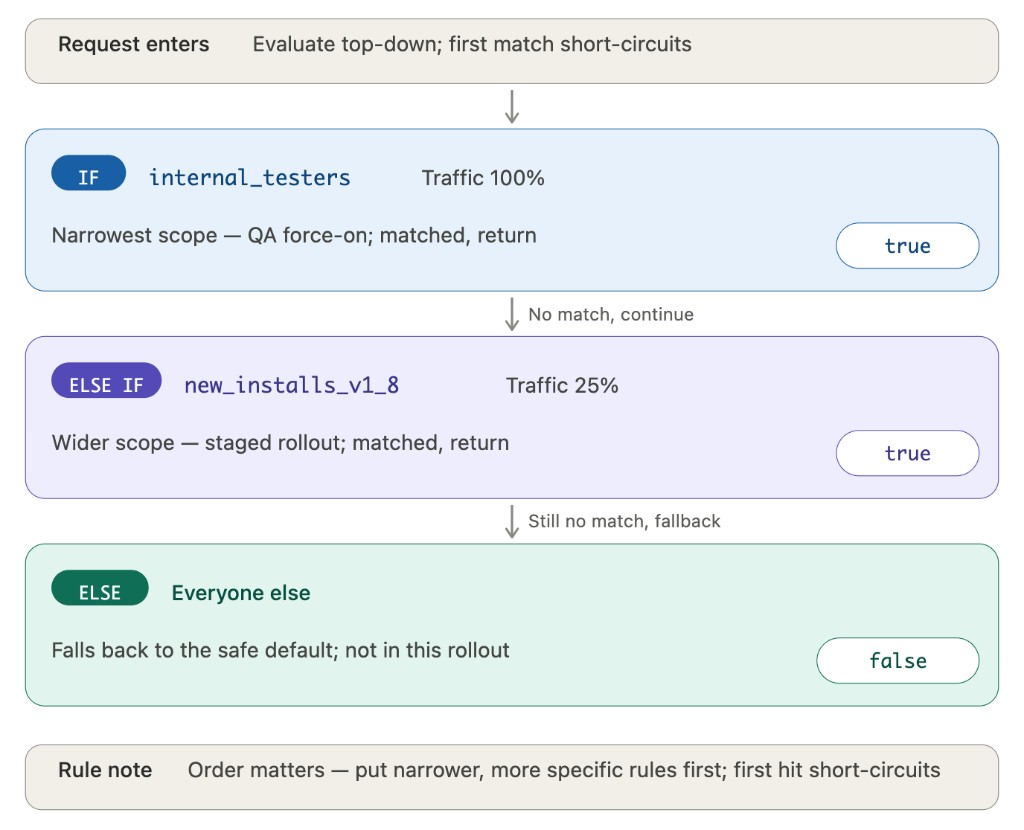
That is: if the user is currently participating in a Remote Config Experiment that covers the parameter being fetched, the variant's value is returned; otherwise, the value from the configuration page is returned.
Retrieval example: User matches Audience 1 and is in the treatment variant — Parameter A = 12, Parameter B = 22
| Parameter | Source | Value | Notes |
|---|---|---|---|
| Parameter A | Experiment | 12 | User is in treatment variant; experiment value returned |
| Parameter B | Experiment | 22 | User is in treatment variant; experiment value returned |
| Parameter C | Configuration | 2 | Not in any experiment; audience 1 config value returned |
| Parameter D | Configuration | 12 | Not in any experiment; audience 1 config value returned |
Shipping logic and decisions
Shipping rules
| Rule | Description |
|---|---|
| Write-back target | Writes winning variant parameter values back to the audience condition list for each parameter involved in the experiment |
| Audience already exists | Updates the audience's parameter value to the winning variant value |
| Audience does not exist | Adds the audience to the parameter's condition list, placed at the top by default |
| Mutability of conditions / values | At ship time, the audience's targeting conditions and parameter values cannot be changed — only ordering (priority) can be adjusted |
| Position of "All other users" | Always placed last; cannot be repositioned |
Shipping example
Experiment: Audience = North America users, Parameter A winning value = 12, Parameter B winning value = 22
Before shipping, Parameter A's condition list:
| Order | Audience | Value |
|---|---|---|
| 1 | Europe users | 8 |
| 2 | APAC users | 5 |
| - | All other users | 3 |
After shipping, Parameter A's condition list (North America users added, placed at top by default):
| Order | Audience | Value | Change |
|---|---|---|---|
| 1 | North America users | 12 | New — locked from experiment |
| 2 | Europe users | 8 | Unchanged |
| 3 | APAC users | 5 | Unchanged |
| - | All other users | 3 | Unchanged |
You can drag to reorder the position of North America users on the ship confirmation page.
Value summary
| Value | Specific benefit |
|---|---|
| Double experiment throughput | Experiments for different user segments run in parallel — no more queueing; experiment cycles are at least 50% shorter in the early launch phase |
| Precise result delivery | Experiment results are automatically consolidated into configuration per audience dimension — no more "experiment done but conclusions never land" |
| Organized parameter management | Parameter group categorization keeps things manageable even as business parameters grow |
| Lower operational risk | Automatic conflict validation + ship confirmation + version history reduce human error |
| Supports fine-grained operations | Operating strategies for different platforms, user segments, and regions can be optimized independently — true personalization at scale |