

End an Experiment and Make a Decision
This page is for experiment owners who are ready to close an In Progress experiment. It covers: when to end an experiment, the difference between Ship and Archive, how to perform each action, and how decisions are recorded for audit.
When to end an experiment
The platform will not stop an experiment on your behalf. Base your decision on the signals in Results:
| Signal | Meaning |
|---|---|
| Primary metric is significant | Suggestion no longer asks you to "keep collecting"; the metric row shows a clear directional difference. The winning variant is your Ship candidate |
| Enough samples but flat results | Cumulative exposures have reached the planned sample size; the relative difference hovers near 0 and the confidence interval crosses 0. The honest answer is Archive |
| Guardrail or risk signal triggered | SRM failed, a parameter change warning banner appeared, or a guardrail metric moved in the wrong direction. Stop the experiment |
| Hypothesis is no longer relevant | The product shape or audience has changed; the results cannot inform a real decision. Archive it |
The platform does not require you to wait for a fixed calendar cycle. Until you take action, the status bar stays In Progress.
Make Decision
- Ship — ship a winning variant
- Archive — archive the experiment without shipping any variant
Both tabs share the same Reason for Decision text field; the text you enter is recorded in the experiment's History.
Ship: take the winning variant live
Choose Ship when one variant has clearly won and you want its parameter values to become the new default.
Steps
- Click Make Decision in the experiment header
- The dialog opens to the Ship tab by default, with the title A better group has been found
- Expand the dropdown and select the variant to ship (the Ship button is disabled until a selection is made)
- Optional: enter a one-sentence reason for the decision
- Click Ship
After Ship
| What changes | Behavior |
|---|---|
| Layer parameter defaults | Updated to the winning variant's parameter values. All audiences on that layer now read the new values |
| Experiment status | In Progress → Shipped |
| Traffic allocation | Drops to 0%; available traffic in the layer is restored |
| Allowlist | Deactivated |
| Setup | Becomes read-only; the Shipped label appears next to the winning variant |
| Make Decision button | Disappears |
| Results | Historical data remains viewable |
| History | A Ship experiment entry is added (operator, timestamp, reason) |
When to choose Ship
All of the following must be true:
- Status is In Progress and the sample size is sufficient to draw a conclusion
- Suggestion points to a clear leading variant, or the primary metric Comparison is statistically significant
- No Risk warning at the top of Results (SRM passed, no parameter change alert)
- The variant you are selecting is genuinely the one you want as the new default
Archive: close without shipping
Choose Archive when there is no winner, or when the experiment is no longer the right question to ask.
Steps
- Switch to the Archive tab in the Make Decision dialog
- Optionally enter a reason for the decision
- Read the red warning: after archiving, parameters revert to defaults and the experiment cannot be restarted
- Click Archive
After Archive
| What changes | Behavior |
|---|---|
| Layer parameter defaults | Unchanged; audiences revert to the original defaults |
| Experiment status | In Progress → Archived |
| Traffic allocation | Drops to 0%; available traffic in the layer is restored |
| Allowlist | Deactivated |
| Setup | Becomes read-only |
| Make Decision button | Disappears |
| Results | Historical data remains viewable |
| History | An Archive experiment entry is added |
| Recoverable | No — once archived, the experiment cannot be restarted |
When to choose Archive
- Sample size is sufficient and there is no significant difference in the primary metric (Comparison near 0, confidence interval crosses 0)
- Suggestion shows No winning variant found or No better group in primary metrics
- A guardrail or risk signal was triggered (SRM failed, parameter change alert, a key guardrail metric moved in the wrong direction)
- The hypothesis itself is outdated (the product shape or audience changed while the experiment was running)
You can also archive a Not Started draft directly from the Experiments list using ⋮ → Archive (this skips the dialog and does not capture a reason).
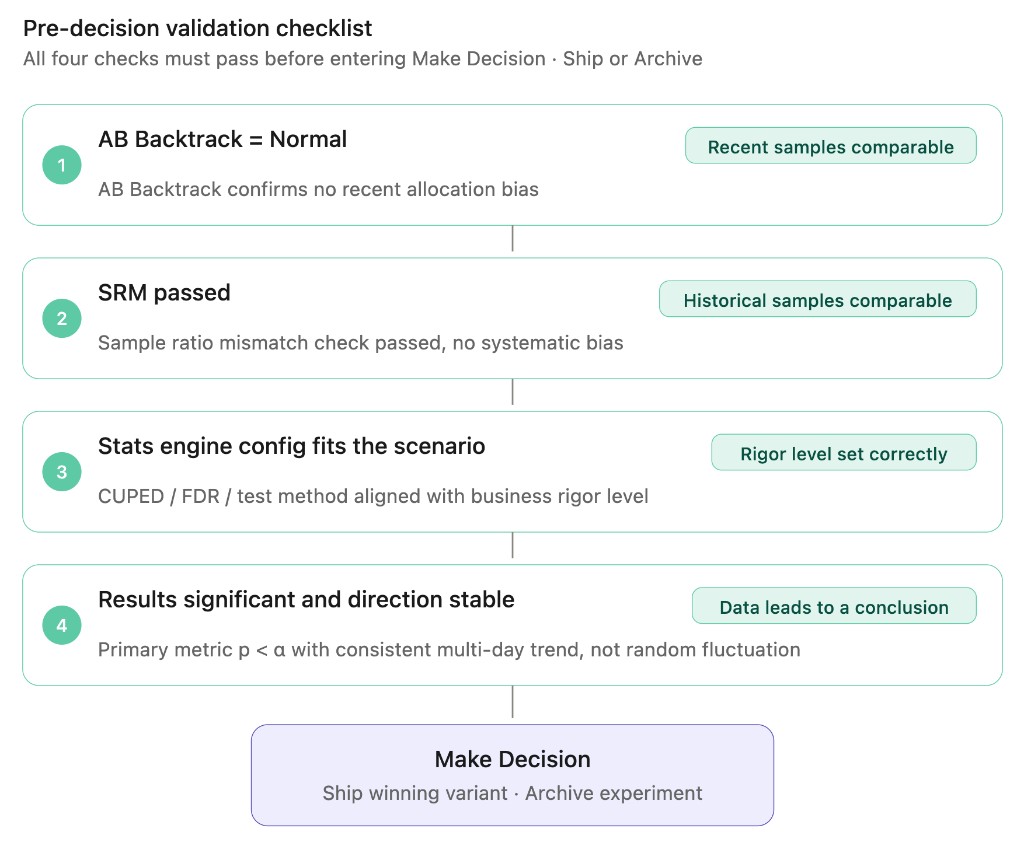
Pre-Ship checklist
Before clicking Make Decision, go through these items against Results:
| Check | Where to look |
|---|---|
| Sample size has reached or exceeded the planned target | Cumulative exposures card |
| Primary metric direction matches the hypothesis and is significant | Metrics table |
| No Risk warning at the top of Results | Top of page |
| Sample ratio check passed (SRM) | SRM status |
| Experiment backtrack shows Normal | Backtrack tab |
| The parameter values of the variant you want to Ship are the values you intend to go live | Setup → variants and parameters |
| You can write a one-sentence reason for the decision | Dialog text field |
If any row cannot be checked, do not Ship — at most Archive, and more often let the experiment keep running.
Decision log (History)
Both types of decision are recorded in the experiment's History log (header ⋮ → History).
| Action | Meaning |
|---|---|
| Create experiment | The experiment was created |
| Experiment started | Start was clicked; entered In Progress |
| Ship experiment | Make Decision → Ship confirmed |
| Archive experiment | Make Decision → Archive confirmed |
Each entry shows the operator's avatar, username, and UTC timestamp. The decision reason text is stored with the entry and serves as the team's audit record.