

User Property Tables
A User Property Table is a table whose rows describe who a user is — country, app version, lifecycle segment, paying status, retention cohort — rather than what a user did. ABetterChoice reads these tables to power Dimensions and Features.
Where to find this in the console
Data Management → Tables lists every registered table. The rows that match this page are the ones with Type User Property Data Source.
Naming consistency
The list page labels these rows as User Property Data Source, but the New Table dialog's Table Type dropdown and the detail page label the same type as User Property Table. Both refer to the same object — these docs use User Property Table as the canonical name.
Required form fields
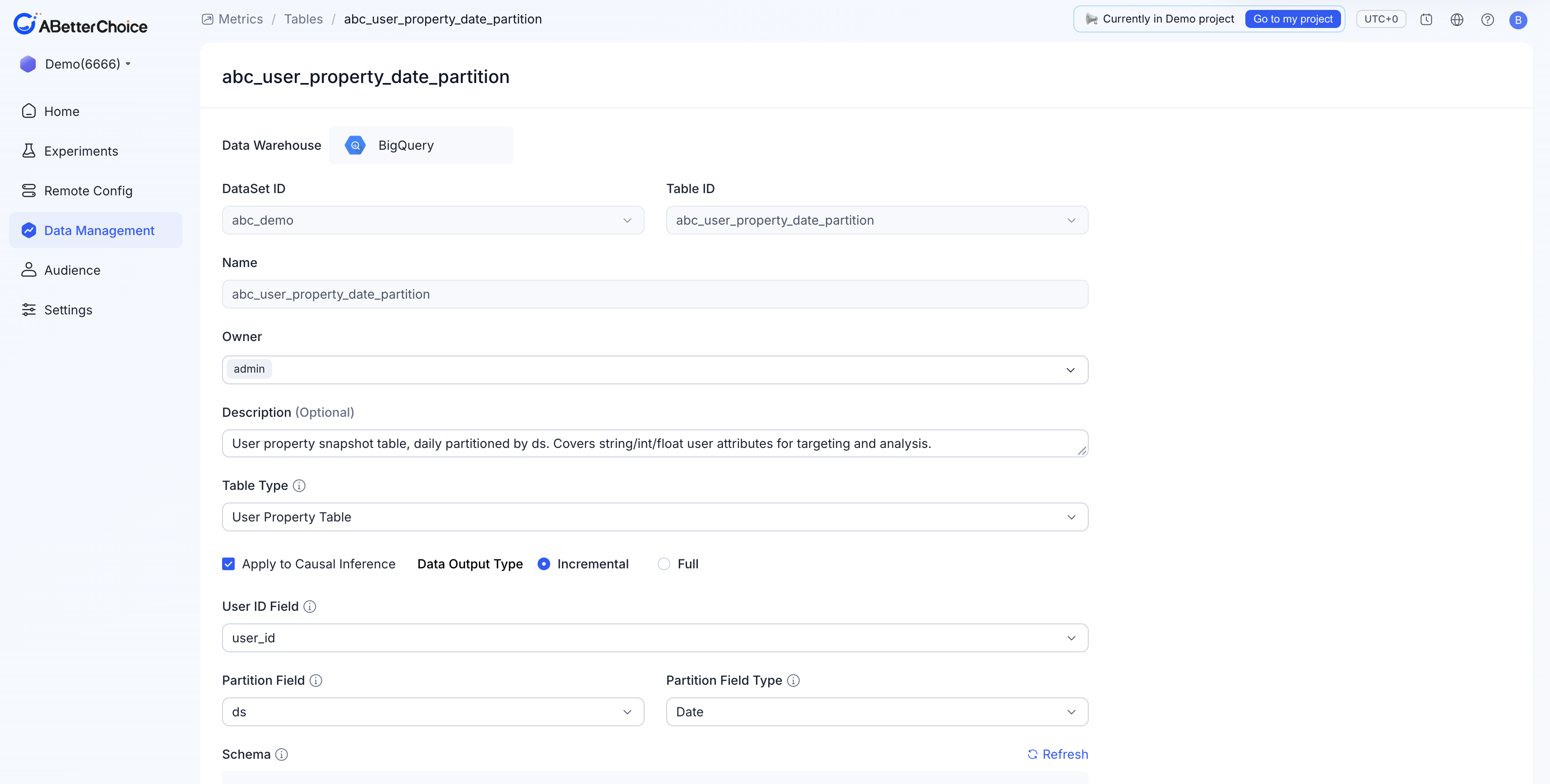
Open New Table (or the detail page of an existing User Property Table). When Table Type is User Property Table, the form requires:
| Field | Notes |
|---|---|
Data Warehouse | Fixed at BigQuery for every project today. |
DataSet ID | The BigQuery dataset that holds the source table. |
Table ID | The BigQuery table to register; the dropdown is filtered by DataSet ID. |
Name | Display name. Defaults to Table ID. |
Owner | Defaults to the current user and cannot be cleared. |
Description (Optional) | Free-text. |
Apply to Causal Inference | Checkbox. When enabled, the table's columns become available for registration as Features, which the platform consumes for HTE analysis and CUPED variance reduction. |
Data Output Type | Radio: Incremental (default) or Full. Tells ABetterChoice whether each new partition is a delta or a full snapshot. |
User ID Field | The column joined to your Assignment and Fact tables. |
Partition Field | The column ABetterChoice uses to pick the right snapshot. |
Partition Field Type | Date, Timestamp, or Datetime. |
User Property Tables do not expose an Event Time Field — they describe per-user state, not per-event activity.
The Schema panel below lists the BigQuery columns and their detected types.
Incremental vs Full
Data Output Type is the one field unique to User Property Tables that materially changes how ABetterChoice reads the data:
Incremental— each partition contains only the rows that changed that day. ABetterChoice merges partitions on read to reconstruct each user's latest state.Full— each partition is a complete snapshot of every user as of that day. ABetterChoice reads the latest partition only.
Pick the value that matches how your upstream pipeline actually writes the table. Mismatched declarations lead to either over-counting (declaring Full when the table is incremental) or under-counting (the inverse).
What a real User Property Table looks like
The Demo project 6666 registers abc_user_property_date_partition as its User Property Table — a daily user-attribute snapshot covering string, integer, and float user attributes for targeting and analysis. Its registration uses:
Apply to Causal Inference— checked.Data Output Type—Incremental.User ID Field=user_id,Partition Field=ds,Partition Field Type=Date.
Its schema covers four kinds of attributes:
| Group | Columns | Used for |
|---|---|---|
| Identity & partitioning | user_id (string), ds (date) | Joins and snapshot selection. |
| Device & locale | country, language, device_platform, device_model, os_version, app_version, install_channel (string) | Dimension slicing and feature columns. |
| Demographics & segments | gender, user_segment (string); age (integer) | Feature columns for HTE. |
| Behavioral aggregates | register_days, total_login_days, total_session_count, max_level_passed, total_pay_count (integer); total_pay_amount_usd, total_ad_revenue_usd, ltv_predicted_usd, avg_session_duration_minute, retention_d7 (float) | Pre-experiment baselines, CUPED covariates, and feature columns. |
How dimensions and features consume it
A User Property Table feeds:
- Dimensions — segment definitions used to slice experiment results.
- Features — when
Apply to Causal Inferenceis enabled, columns become available for registration as features that feed HTE analysis.
Dimensions do not appear in HTE analysis. HTE consumes only Features and Feature Combinations. Audiences do not consume User Property Tables; audience rules resolve against attributes registered separately under Audience.
Editing and archiving
The detail page is read-mostly. Apply to Causal Inference and Data Output Type can be toggled later, but changes don't backfill historical results. The only destructive action is Archive on the list page; see Table Lifecycle.