

Fact Tables
A Fact Table records what users did — events, transactions, durations, ad views, IAP amounts. Every metric in ABetterChoice is defined against one or more Fact Tables, so registering them is the prerequisite for measuring anything beyond cumulative exposures.
Where to find this in the console
Data Management → Tables lists every registered table. Rows where Type is Fact Table are the ones described on this page. Click a row to open the table's detail page.
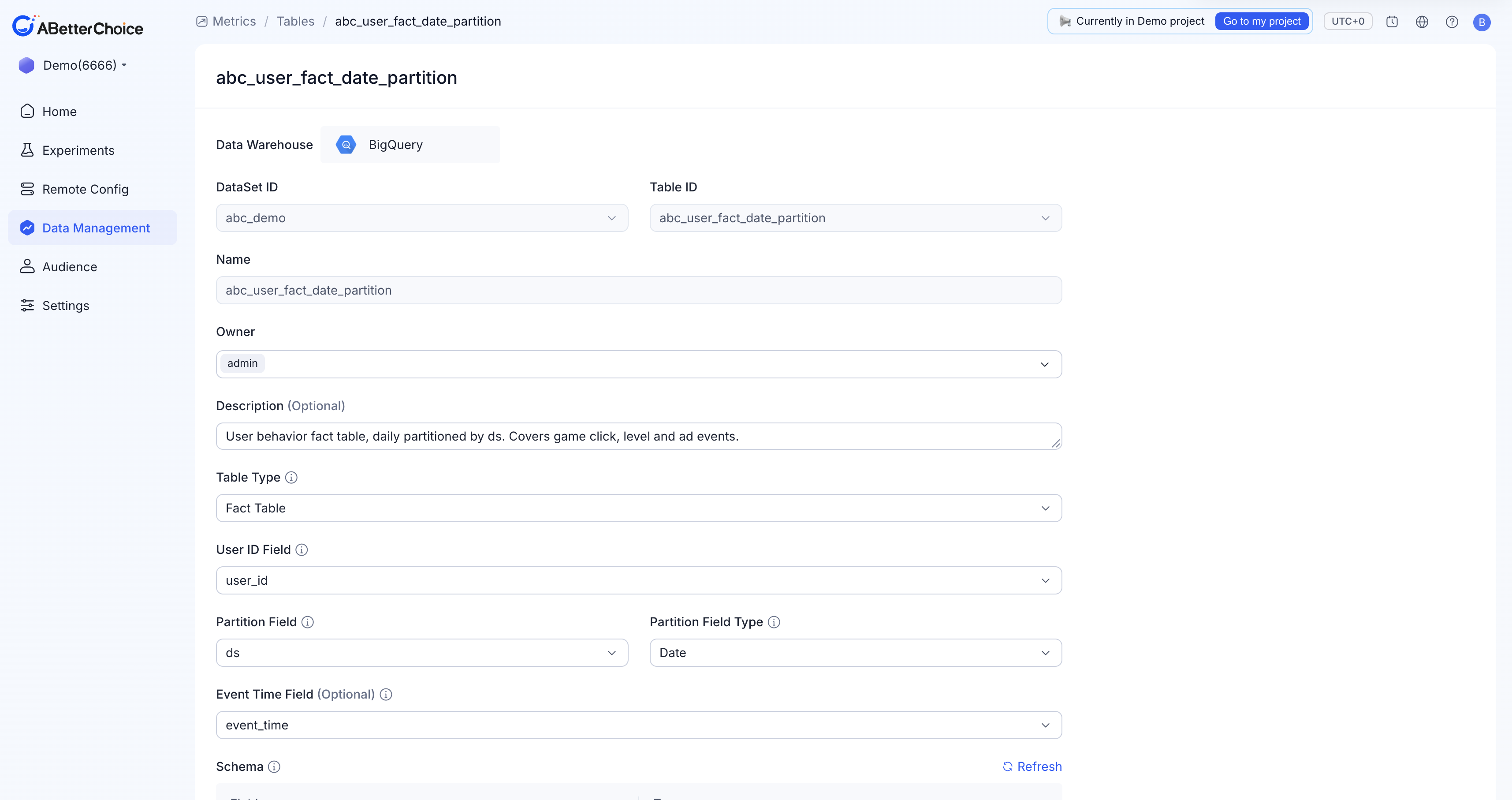
Required form fields
Open New Table (or the detail page of an existing Fact Table). When Table Type is Fact Table, the form requires:
| Field | Notes |
|---|---|
Data Warehouse | Fixed at BigQuery for every project today. |
DataSet ID | The BigQuery dataset that holds the source table. |
Table ID | The BigQuery table to register; the dropdown is filtered by the chosen DataSet ID. |
Name | Display name in ABetterChoice. Defaults to Table ID. |
Owner | Defaults to the current user and cannot be cleared. |
Description (Optional) | Free-text. |
User ID Field | The column ABetterChoice joins to the Assignment Table's User ID Field. |
Partition Field | The column ABetterChoice uses to scan event data day by day. |
Partition Field Type | One of Date, Timestamp, Datetime. Choose the value that matches how the column actually stores time on the warehouse side. |
Event Time Field (Optional) | A separate column for the precise event time, when it differs from the partition column. Mainly used by MAB Experiment metrics to filter user data precisely by event time. |
Fact Tables do not have an Experiment Field — that field is unique to Assignment Tables. The Schema panel below the form lists every column ABetterChoice detected on the BigQuery side, with its type. Use the Refresh link to re-read the upstream schema.
What a real Fact Table looks like
The Demo project 6666 registers abc_user_fact_date_partition as its Fact Table — a user-behavior event log covering game click, level, and ad events. Its registration uses:
User ID Field=user_idPartition Field=dswithPartition Field Type=DateEvent Time Field=event_time(the precise per-event timestamp, distinct from the daily partition column)
Its schema groups naturally into four buckets:
| Group | Columns | Typical use |
|---|---|---|
| Identity & time | user_id (string), ds (date), event_time (string), event_code (string) | Subject identification, partitioning, and event taxonomy. |
| Click events | click_target, click_scene (string); click_position_x, click_position_y (float); click_count (integer) | Counts and positional analysis for UI experiments. |
| Level events | level_id (integer), level_name, level_difficulty, level_result (string); level_duration_seconds (float); level_score, level_star, level_retry_count (integer) | LiveOps level-tuning metrics. |
| Ad events | ad_unit_id, ad_type, ad_placement, ad_network (string); ad_revenue_usd, ad_ecpm (float); ad_is_clicked (integer) | Ad-yield experiments. |
You don't have to match these column names — only the role bindings you set in the form. Different teams keep different shapes here; the platform reads whatever you point it at.
How metrics consume a Fact Table
A Fact Table is the unit of measurement for Metrics. When you create a metric, you pick a Fact Table as its source, then choose:
- The
Metric Type(User Proportion, Average, User Count, Ratio, Sum) — see Metric Types. - The numeric column(s) used for the formula (for example,
ad_revenue_usdfor ad revenue orlevel_duration_secondsfor time-on-level). - Any qualifying-event filters.
Multiple metrics can share the same Fact Table.
Editing and archiving
The detail page is read-mostly. The Update button stays disabled until you change a field; the only destructive action is Archive on the list page. See Table Lifecycle for how archiving propagates to dependent metrics.