

Feature List
A Feature is a named view over one column of a registered source table, with an optional grouping (binning) rule. Features are the building blocks the platform uses to pre-process inputs for HTE (Heterogeneous Treatment Effect) Analysis — they describe which user attributes the model may split treatment effects on. Features live under Data Management → Feature List.
Where to find this in the console
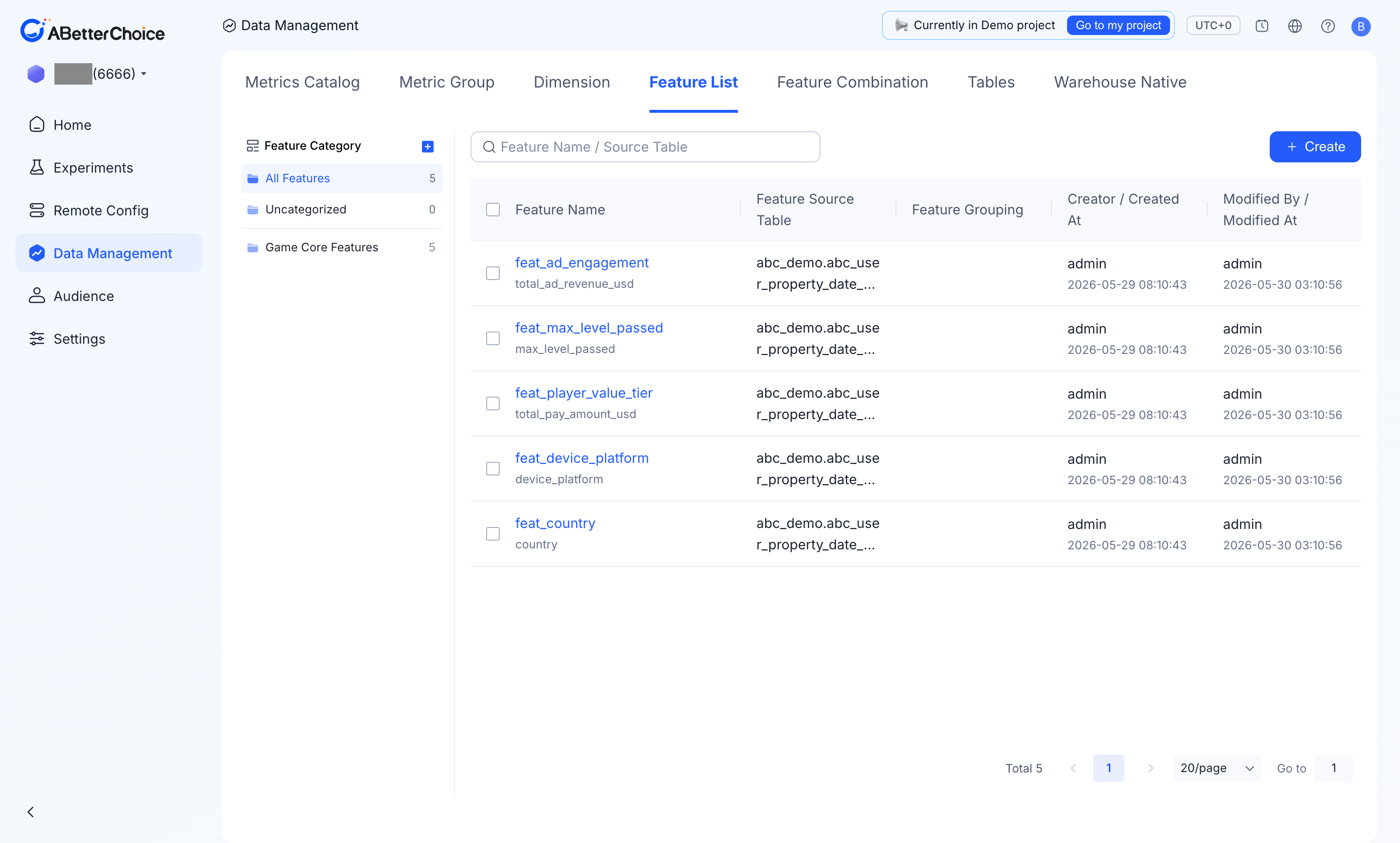
Data Management → Feature List. The page has a Feature Category rail on the left, a search box (Feature Name / Source Table), and a Create button.
Feature Category rail
The left rail groups features into categories and shows a count per category:
All Features— every feature in the project.Uncategorized— features not assigned to a category.- Custom categories (e.g.
Game Core Features) — created with the+button next to the rail title.
A category is set per feature with the Feature Category field (see Create a feature).
Columns shown
| Column | What it shows |
|---|---|
Feature Name | The feature name, with the underlying source field beneath it (e.g. feat_country → country). |
Feature Source Table | The table the field is read from, e.g. abc_demo.abc_user_property_date_partition. |
Feature Grouping | The binning rule applied to the field, if any. |
Creator / Created At | Who created the feature and when. |
Modified By / Modified At | Who last changed it and when. |
Status | Lifecycle state — Active for usable features. |
Actions | Edit, Duplicate, Archive. |
The demo project registers five features, all reading from the abc_user_property_date_partition user-property table: feat_country (country), feat_device_platform (device_platform), feat_player_value_tier (total_pay_amount_usd), feat_max_level_passed (max_level_passed), and feat_ad_engagement (total_ad_revenue_usd).
Create a feature
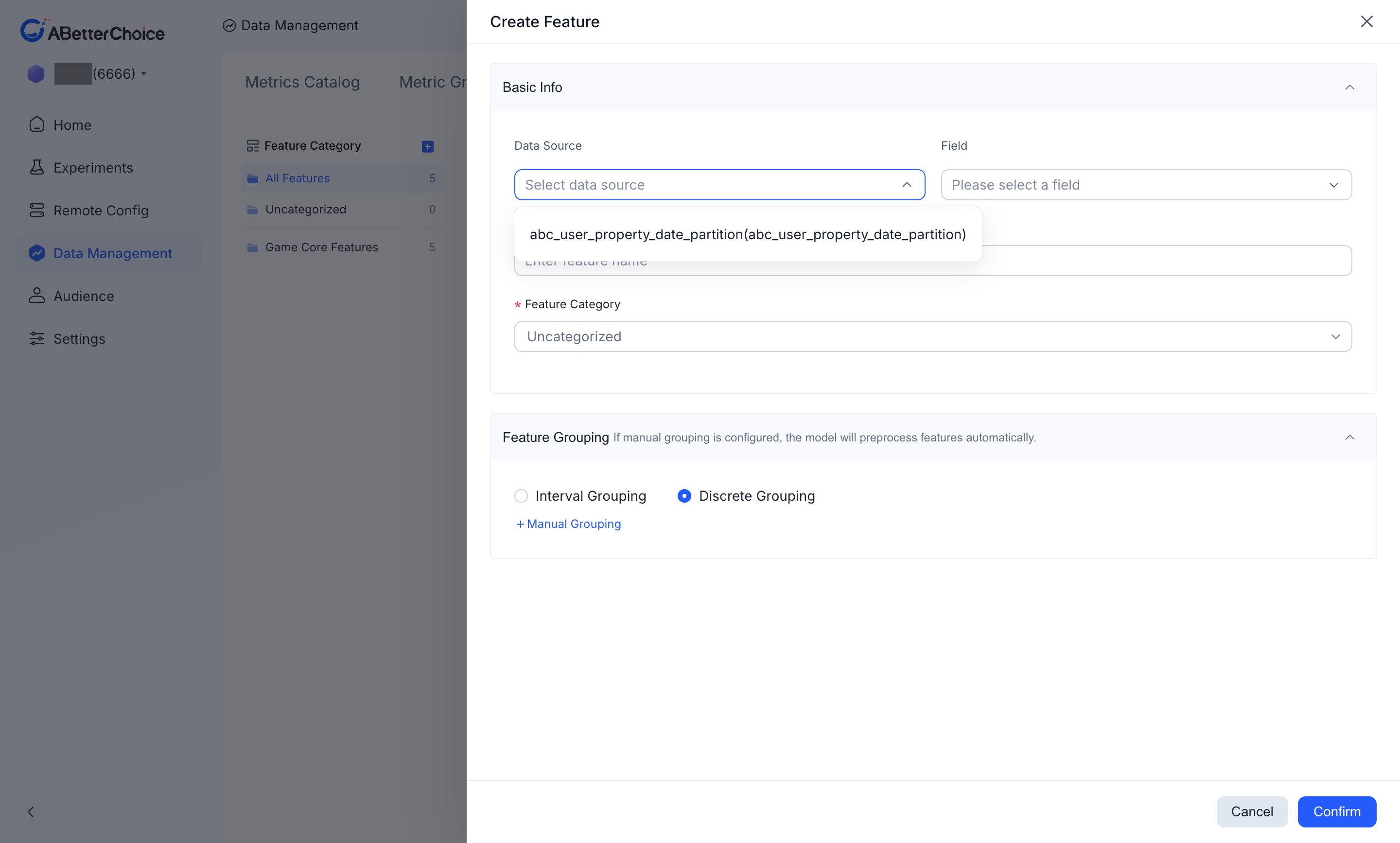
Create opens the Create Feature dialog with two sections.
Basic Info
Data Source— the registered source table to read from.Field— the column within that table.Feature Name(required) — the display name.Feature Category(required) — defaults toUncategorized; pick an existing category to file the feature under.
Feature Grouping
The grouping rule controls how raw values are bucketed before the model uses them. As the dialog notes, "If manual grouping is configured, the model will preprocess features automatically." Pick one:
Interval Grouping— bucket a numeric field into ranges.Discrete Grouping— treat each distinct value as its own bucket (the default).+ Manual Grouping— define buckets by hand.
Confirm with Confirm or discard with Cancel.
Where features show up
- Bundled into a Feature Combination, which is the unit consumed by an experiment's HTE analysis.
- As candidate sub-populations the model can split treatment effects on in HTE (Heterogeneous Treatment Effect) Analysis on the experiment Results page.
Feature vs Audience vs Dimension
A Feature is for modelling, not targeting or slicing — see Feature vs Audience vs Dimension for the boundary.