

Assignment Tables
An Assignment Table records who saw which variant of which experiment, and when. Every running experiment in ABetterChoice resolves its exposures, traffic split, and primary-metric joins against an Assignment Table.
Where to find this in the console
Data Management → Tables lists every registered table. Rows where Type is Assignment Table are the ones described on this page. Click a row to open the table's detail page.
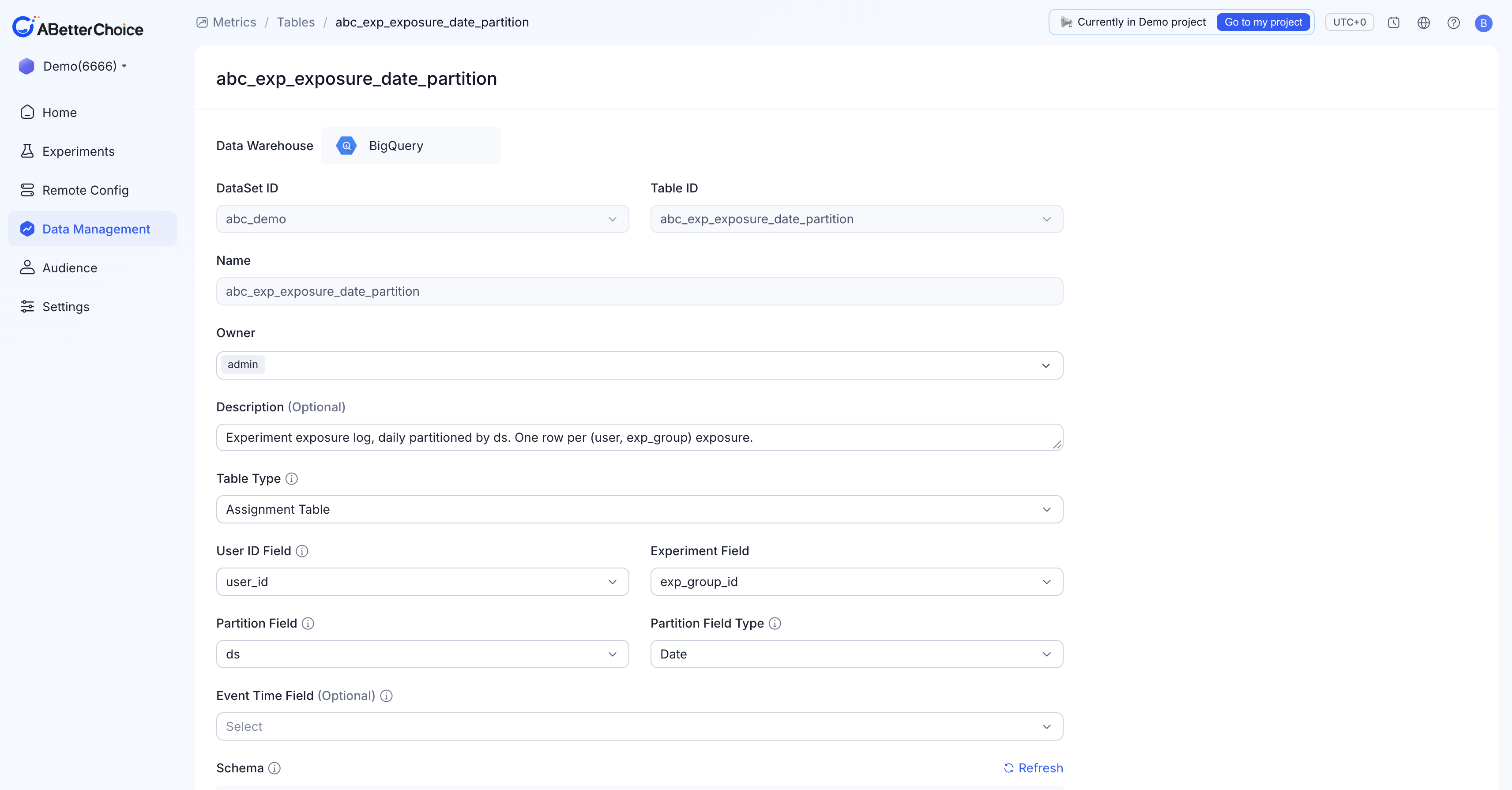
Required form fields
Open New Table (or the detail page of an existing Assignment Table). When Table Type is Assignment Table, the form requires:
| Field | Notes |
|---|---|
Data Warehouse | Fixed at BigQuery for every project today. |
DataSet ID | The BigQuery dataset that holds the source table. |
Table ID | The BigQuery table to register; the dropdown is filtered by the chosen DataSet ID. |
Name | Display name in ABetterChoice. Defaults to Table ID. |
Owner | Defaults to the current user and cannot be cleared. Add additional owners as needed. |
Description (Optional) | Free-text. |
User ID Field | The column ABetterChoice uses as the experiment subject identifier. It must match the corresponding column in your fact and user-property tables for joins to work. |
Experiment Field | The column that ties an exposure to a specific experiment (for example, exp_group_id). |
Partition Field | The column ABetterChoice uses to scan exposure data day by day. |
Partition Field Type | One of Date, Timestamp, Datetime. Choose the value that matches how the column actually stores time on the warehouse side. |
Event Time Field (Optional) | A separate column for the precise event time, when it differs from the partition column. |
After all required fields are filled, the Schema panel renders the BigQuery columns with their detected types. Use the Refresh link if you change upstream columns mid-flow.
Partition Field Type options
ABetterChoice supports three partition styles for Assignment Tables:
Date— the column stores a calendar day (e.g. BigQueryDATE).Timestamp— the column stores a precise instant (e.g. BigQueryTIMESTAMP).Datetime— the column stores a wall-clock datetime without timezone (e.g. BigQueryDATETIME, or aSTRINGformatted asYYYY-MM-DD HH:MM:SS).
Pick the type that matches how the column physically stores time. ABetterChoice uses this declaration to write efficient partition-pruning predicates back into BigQuery.
What a real Assignment Table looks like
The Demo project 6666 registers abc_exp_exposure_date_partition as its Assignment Table. The form configuration is:
User ID Field=user_idExperiment Field=exp_group_idPartition Field=ds,Partition Field Type=Date
And its schema is short and explicit — exactly what an exposure log needs:
| Field | Type | Role |
|---|---|---|
ds | date | Mapped to Partition Field with Partition Field Type = Date. |
user_id | string | Mapped to User ID Field. |
exp_group_id | string | Mapped to Experiment Field; ties an exposure to a specific experiment group / variant. |
exposure_time | string | Available as Event Time Field if you need event-level precision. |
You don't have to match these column names — only the field roles you map in the form. Names are conventions, the role bindings are the contract.
Editing and archiving
The detail page is read-mostly: most fields show their current value and the Update button stays disabled until you actually change something. The only destructive action is Archive from the list page's Actions column. See Table Lifecycle for what Archive does to dependent experiments.