

Defining Your Data Model
Register warehouse tables under Data Management → Tables so the rest of the team can build experiments, metrics, and audiences on top of them.
ABetterChoice does not maintain its own copy of your data — it reads directly from the warehouse you connected (today, BigQuery). Each registered table tells the platform "this BigQuery table plays a specific role in my experiment data model."
The three table types
| Type | Role | Required to run experiments? |
|---|---|---|
| Assignment Table | Records who saw which experiment variant, and when. The single source of truth for exposures. | Yes — at least one is needed before an experiment can read results. |
| Fact Table | Records what users did (events, transactions, durations, counts). Metrics are defined on top of one fact table. | Yes — needed once you start measuring metrics beyond cumulative exposures. |
| User Property Table | Records who users are — country, app version, lifecycle segment, paying status. Powers Dimensions and Features. | Optional — only if you want dimension slicing or feature-based HTE analysis. |
The three types are joined on a shared user identifier column. ABetterChoice never moves rows between them; queries push down into the warehouse and join in place.
Where to find this in the console
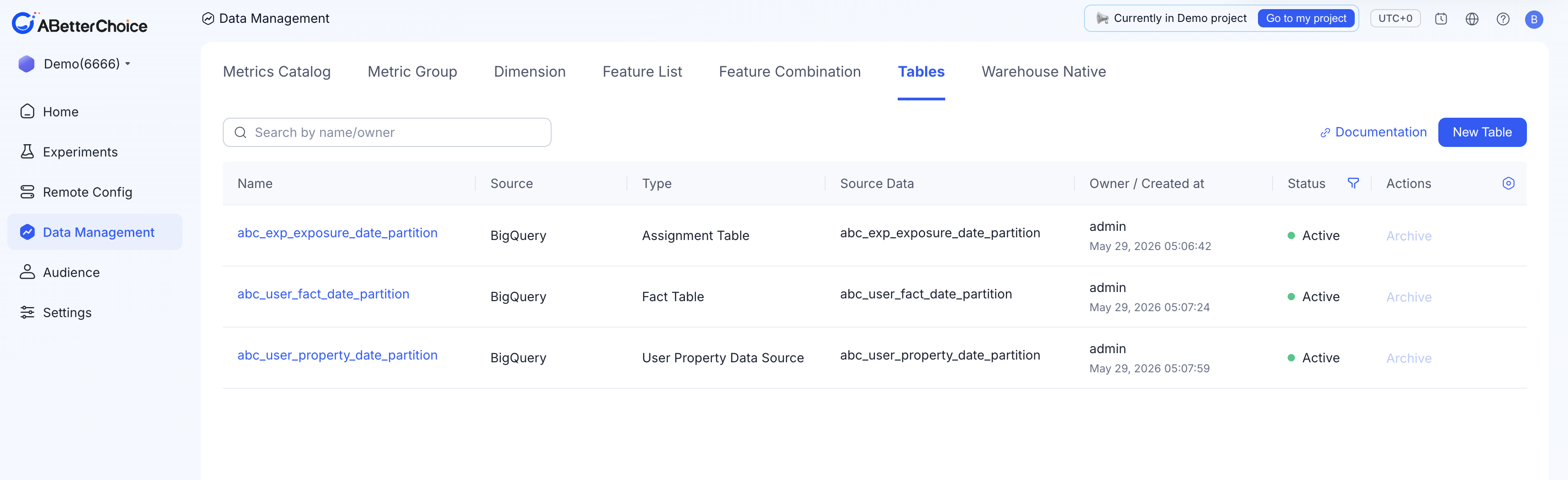
Open Data Management → Tables. The list view shows every registered table with these columns:
Name— the display name you gave the table on registration.Source— currently alwaysBigQuery(see Connecting Your Warehouse).Type—Assignment Table,Fact Table, orUser Property Data Source.Source Data— the underlying BigQueryDataSet ID/Table ID.Owner / Created at— the registering user and timestamp.Status—Activeor archived.Actions—Archiveonly; archived tables surface in the same list.
A search box (Search by name/owner), a Documentation link, and a New Table button sit above the list.
Naming consistency
The list page labels the third type as User Property Data Source, but the New Table dialog and the table detail page label the same type as User Property Table. The two labels refer to the same object — this skill, the docs, and the sidebar all use User Property Table as the canonical name.
How a table becomes part of your model
Click New Table and fill in the form. The dialog adapts to the Table Type you select:
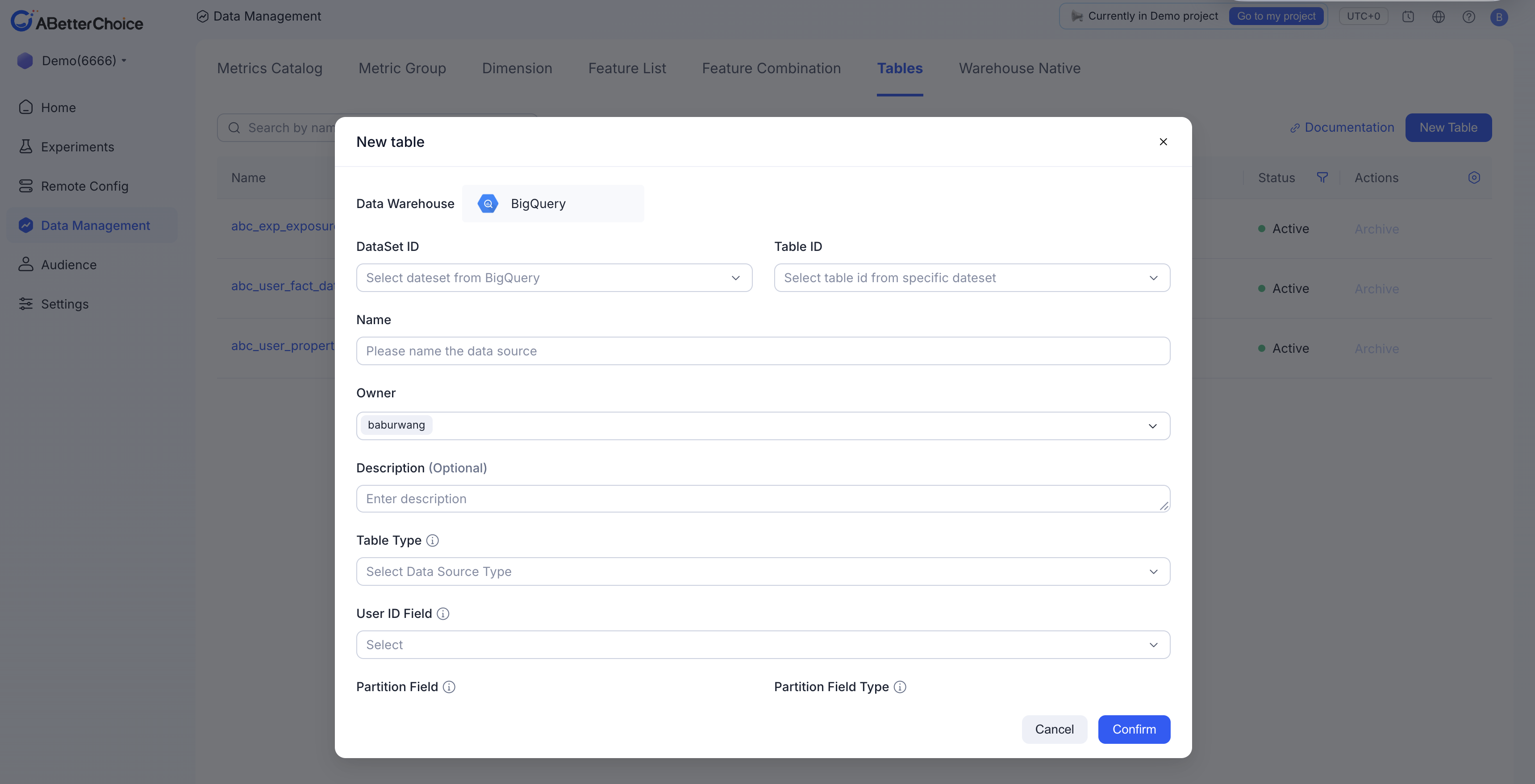
- Pick the source.
Data Warehouseis fixed atBigQuery; pickDataSet ID, thenTable ID(the second dropdown is filtered by the first).Namedefaults to the table ID and is editable.Ownerdefaults to you and cannot be cleared. - Choose a
Table Type. Available values:Assignment Table,Fact Table,User Property Table. - Map the join column in
User ID Field— the column ABetterChoice uses to identify the experiment subject across the three table types. For Assignment Tables, you also map anExperiment Field(e.g.exp_group_id). - Declare the time partition. Pick
Partition FieldandPartition Field Type. The supported types areDate,Timestamp, andDatetime. Optionally setEvent Time Fieldif your event time differs from the partition. - Confirm the schema. ABetterChoice reads the BigQuery schema and lists every column with its detected type. Use the
Refreshlink if upstream columns have changed since you opened the dialog.
Click Confirm to register the table. After registration the table appears in selectors when you create experiments, metrics, dimensions, or features.
Worked example (Demo project 6666)
The Demo project illustrates the data model with three sibling tables, all built on the same abc_demo BigQuery dataset and partitioned daily by ds (Date):
- Assignment Table —
abc_exp_exposure_date_partition. One row per(user, exp_group)exposure. - Fact Table —
abc_user_fact_date_partition. A user-behavior event log covering game click, level, and ad events. - User Property Table —
abc_user_property_date_partition. A daily user-attribute snapshot covering string, integer, and float user properties for targeting and analysis.
When an experiment is created, you pick the Assignment Table as the assignment source; metrics are defined against the Fact Table; dimensions and features read from the User Property Table.